
Do you need to use all your fingers when typing?
Do you really need to use all your fingers when typing, or is it just one of those myths repeated without thinking? What if you already type fast with two or three... why change?
At Kluppy, we don't believe in strict rules, but we do believe in understanding the why behind things. So today we are going to settle this doubt once and for all: we will tell you if you really need to use all your fingers when typing, what the benefits are (or aren't), and how it affects your speed, comfort, and long-term health.
What does it really mean to use all your fingers when typing?
When we talk about using all your fingers when typing, we refer to the touch-typing technique where each finger is assigned specific keys on the keyboard. This is not a trend or a quirk of computer science teachers: it is a system designed to optimize movement, prevent strain, and improve your speed and accuracy.
Instead of constantly moving your hands across the keyboard, you distribute the work among all your fingers, making each one responsible for its own "zone." And although it is hard at first, once you internalize it, your brain and hands work on autopilot. Yes, just like when you brush your teeth or unlock your phone without looking.
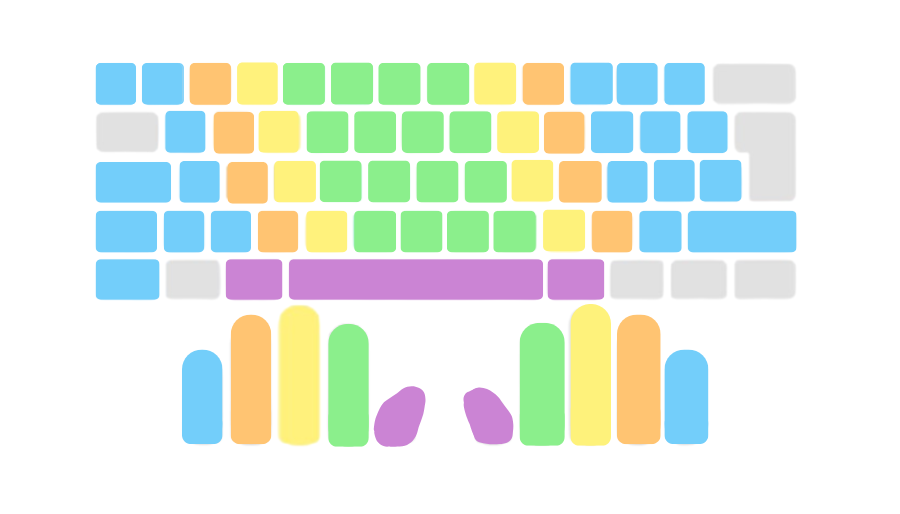
Why does using all your fingers when typing improve your speed?
The main reason to use all your fingers when typing is simple: the keyboard is designed for that. When you only use two or three, you make them work harder than they should, while the others rest as if it has nothing to do with them. The result: unnecessary movements, more mistakes, and a slower pace.
Using all ten fingers (even if it sounds like a pro gamer move) allows you to type more fluidly and effortlessly. Not because you move your fingers faster, but because you move them less and better. In addition, by distributing the effort, you avoid muscle fatigue, which is important if you spend hours in front of the keyboard.
Using all your fingers when typing reduces errors
One of the most noticeable advantages of using all your fingers when typing is the reduction of errors. Why? Because your brain learns a fixed and constant pattern. Every time you are going to type "a", for example, you use the same finger, from the same position. This creates muscle memory and allows you to type without looking or hesitating.
On the other hand, if you improvise each letter, it is easier to press the wrong key, cross your fingers, or lose your rhythm. Using all your fingers not only improves your speed, but also your accuracy. And fewer errors = less frustration = more flow.
What if I already type fast with just a few fingers?
Good question. There are people who type fast using only a few fingers, and that can work... up to a point. But there are three things you should keep in mind:
- It is not always efficient: you can type fast, but you are putting in more effort than necessary.
- It is hard to scale: reaching 50 words per minute is possible, but what if you want to reach 70, 80, or more?
- Your body suffers: typing a lot with few fingers strains your wrists, shoulders, and neck.
So, although it is not mandatory, using all your fingers when typing is an investment in your future.
Can you learn to use all your fingers when typing if you already have your own style?
Of course! Learning to use all your fingers when typing does not mean erasing what you already know, but improving on that foundation. You can retrain yourself step by step, without stress.
At Kluppy, for example, we work with short, dynamic, and gamified exercises so that relearning is not a punishment. The goal is not for you to feel clumsy when changing techniques, but to feel motivated as you see how you improve every day.
And the best part: you can start from wherever you are. It doesn't matter if you type with four fingers or with one. The important thing is wanting to improve and having the right tools.
How to start using all your fingers when typing
If you want to start using all your fingers when typing, here are some practical tips:
- Start by positioning your hands correctly: home row position on the F and J keys.
- Work one finger at a time: train specific key combinations.
- Keep sessions short and consistent: 10 minutes a day is better than 1 hour a week.
- Do not look at the keyboard: cover the keys if necessary, forcing your fingers to remember.
- Be patient: you will go slower at first, but it is only temporary.
Remember: every mistake is part of learning. It is not an exam, it is practice. And the more fun you have with the process, the easier it will be to progress.
Kluppy: your ally for learning typing
Does changing your technique seem difficult? At Kluppy we make it easy for you: exercises adapted to your level, challenges, and tracking of your progress so you notice improvement from day one.
No boring methods or endless repetitions. You learn to use all your fingers when typing in an intuitive, fun, and motivating way. And without realizing it, one day you are typing fast, without looking, without errors... and with all your fingers.
You don't need to be an office robot or type 200 words per minute. But if you want to type more comfortably, faster, and without wearing out your hands, using all your fingers when typing is the way to go.
It's like switching from running in flip-flops to wearing good running shoes: you can really feel the difference. So, why not give it a try?
Start today training with Kluppy and discover how it feels to type with all your fingers and zero frustration
Want a FREE demo?
or if you prefer